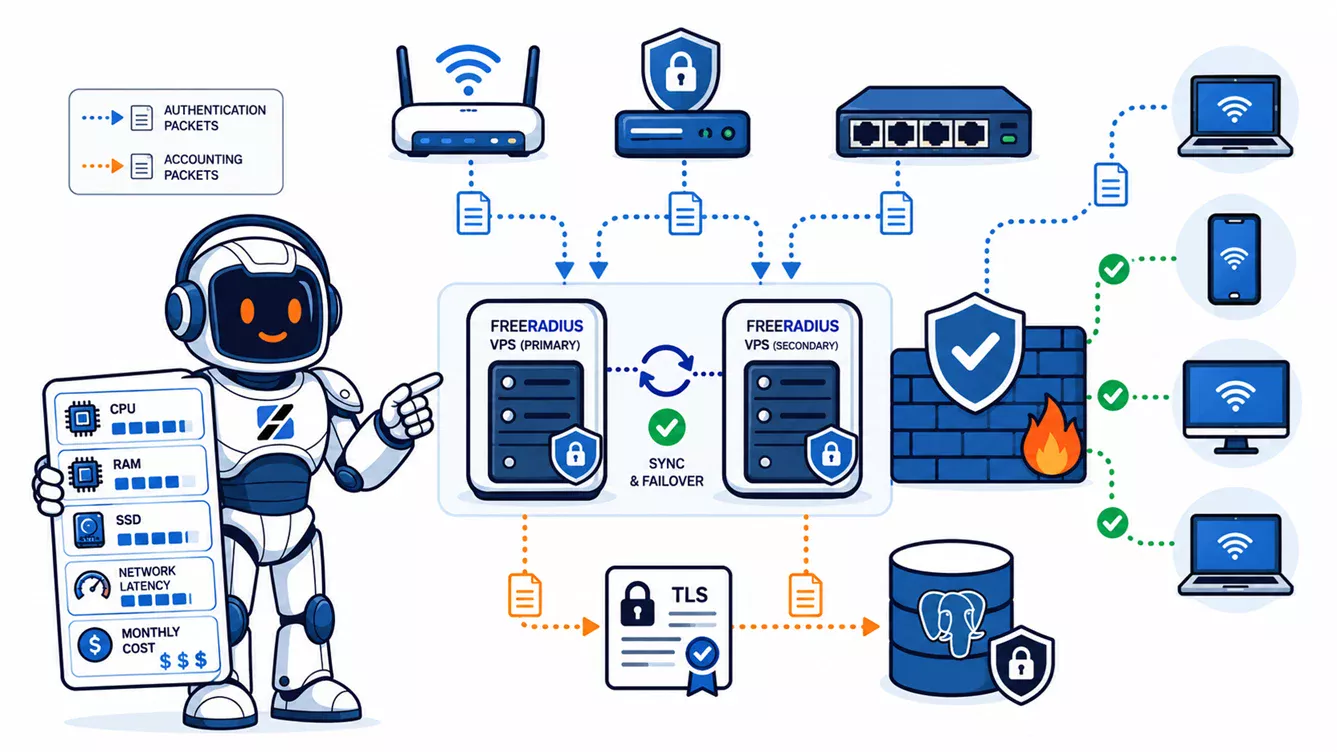
For most production FreeRADIUS VPS hosting, start with 2 vCPU, 2 GB RAM, 25 GB SSD storage, and one public IPv4 address. On current ServerSpan plans, ct.Ready costs €5.99 per month excluding VAT. Use 4 vCPU, 4 GB RAM, and 50 GB storage at €9.99 when the same VPS also runs MariaDB or PostgreSQL, stores frequent accounting updates, or serves several network sites. The 512 MB ct.Entry plan at €2.99 is suitable for a lab, not the default production choice. Two redundant nodes cost €11.98 or €19.98 per month before database, backup, and administration costs.
Written by the ServerSpan Technical Team
FreeRADIUS itself is small, but the authentication path is not
FreeRADIUS can process authentication, authorization, and accounting requests without needing a large server. The official project describes deployments ranging from embedded systems to networks with millions of users. That does not mean every production installation belongs on a 512 MB VPS.
The daemon is only one part of the request path. A real deployment may query LDAP, Active Directory, MariaDB, PostgreSQL, a REST API, or another RADIUS server. It may perform EAP exchanges for 802.1X, write session accounting records, evaluate custom policy, and produce logs that must survive long enough for troubleshooting. The slowest backend usually limits capacity before the FreeRADIUS process exhausts the CPU.
Size the VPS from peak request rate and backend behaviour, not from the number of usernames. Ten thousand accounts that authenticate a few times each day can be lighter than 300 access points that reconnect clients together after a power event.
A 2 GB VPS is the practical production starting point
The table below is a planning model, not an official FreeRADIUS capacity chart. Request complexity, EAP method, database latency, accounting frequency, and NAS retry behaviour can move a deployment into another tier.
| Deployment profile | Suggested resources | Current ServerSpan plan | Monthly VPS cost | Decision rule |
|---|---|---|---|---|
| Lab, proof of concept, configuration testing | 1 vCPU, 512 MB RAM, 10 GB SSD | ct.Entry | €2.99 excluding VAT | Use only when downtime, swap pressure, and limited log space are acceptable |
| Small office, VPN, Wi-Fi, or 802.1X deployment with an external identity backend | 2 vCPU, 2 GB RAM, 25 GB SSD | ct.Ready | €5.99 excluding VAT | Default starting point for one production RADIUS node |
| Local SQL authentication and accounting, several NAS devices, or heavier EAP use | 4 vCPU, 4 GB RAM, 50 GB SSD | ct.Steady | €9.99 excluding VAT | Choose this when the database and accounting data live on the same VPS |
| KVM, Docker, custom kernel networking, or stronger virtual-machine isolation | 2 vCPU, 2 GB RAM, 25 GB SSD | vm.Ready | €9.99 excluding VAT | Use KVM when the deployment needs a full virtual machine rather than a container |
| Larger KVM stack with local SQL, monitoring, and additional services | 4 vCPU, 4 GB RAM, 100 GB SSD | vm.Steady | €17.99 excluding VAT | Use when storage headroom or the wider application stack justifies the higher tier |
The prices and specifications come from the current ServerSpan VPS hosting plans. FreeRADIUS does not require KVM by itself. A container VPS is suitable for a conventional package-based deployment when you do not need Docker, custom kernel modules, or unusual network namespaces.
The cheapest plan can run the daemon, but 512 MB leaves little room for package updates, certificate work, log bursts, a local database, or a debugging session. The €5.99 ct.Ready plan is the better production baseline because the extra memory costs less than one failed authentication incident.
Authentication volume matters more than the user database size
FreeRADIUS capacity should be described in requests per second and request latency. Account count is useful for database planning, but it does not tell you how many requests arrive together.
A basic PAP or CHAP login may need one Access-Request and one response. An EAP-based 802.1X login can involve several exchanges before the client is accepted. A school, office, or hotel can therefore generate a sharp request burst when many devices reconnect after an access-point restart, switch reboot, or WAN recovery.
Measure the busiest five-minute period instead of dividing daily logins by 86,400 seconds. The average hides the event that actually fills the worker queue.
FreeRADIUS uses a thread pool and an internal request queue. Its documentation notes that a full queue commonly points to a slow database during a traffic spike. Raising the thread limit repeatedly will not repair a backend that takes too long to answer. The correct response is to measure SQL or LDAP latency, fix indexes and connection pools, or reduce synchronous work in the authentication path.
Accounting traffic can consume more storage than authentication
Authentication records are usually small. Long-term RADIUS accounting can become the main storage workload because each session may create a start, a stop, and many interim updates.
Consider 1,000 always-connected sessions with a five-minute interim interval. That produces up to 288,000 interim updates per day before starts, stops, re-authentication, and retries are counted. The correct retention policy depends on billing, audit, support, and legal requirements. Keeping every record forever on a 25 GB system disk is not a plan.
The SQL module supports MySQL-compatible databases, PostgreSQL, Microsoft SQL Server, and Oracle through separate drivers. The supplied schema includes tables for checks, replies, post-authentication records, and accounting data. When long-running SQL writes begin delaying live RADIUS processing, the official buffered SQL example decouples packet receipt from later database insertion by writing detail files first.
Use 4 GB RAM and 50 GB storage when MariaDB or PostgreSQL runs locally and accounting is enabled. Monitor table growth, purge according to a documented retention policy, and keep database backups outside the VPS. A separate database server becomes reasonable when accounting writes compete with authentication queries or when several RADIUS nodes need one shared identity store.
High availability requires two RADIUS nodes, not a larger single VPS
A larger server improves headroom but does not remove the single point of failure. RADIUS clients such as VPN gateways, wireless controllers, switches, and NAS devices commonly support primary and secondary RADIUS server addresses. Use that mechanism instead of placing both authentication and accounting behind a generic HTTP load balancer.
| Architecture | VPS cost per month | What it protects against | What remains separate |
|---|---|---|---|
| One ct.Ready node | €5.99 excluding VAT | No redundancy | Backups, monitoring, and recovery procedure |
| Two ct.Ready nodes | €11.98 excluding VAT | Failure or maintenance of one RADIUS VPS | Shared SQL or LDAP availability |
| Two ct.Steady nodes | €19.98 excluding VAT | More local headroom plus RADIUS-node redundancy | Database replication and configuration synchronization |
| Two vm.Ready nodes | €19.98 excluding VAT | KVM isolation plus RADIUS-node redundancy | Backend availability and off-site backups |
Put both nodes in the NAS configuration and test the failover behaviour. Some devices retry the primary several times before using the secondary. Others return immediately. A redundant design is not complete until you measure how long a real client takes to authenticate while one server is unavailable.
Configuration must stay synchronized, but shared secrets and private keys should not be copied through an insecure public repository. Store the configuration in a private deployment system, separate secrets from ordinary files, and test each node independently.
Expose RADIUS only to known network devices
Classic RADIUS authentication uses UDP port 1812, while accounting commonly uses UDP port 1813. Do not open those ports to the entire internet. Restrict the VPS firewall to the public IP addresses of the wireless controllers, VPN gateways, switches, or other NAS devices that send requests.
FreeRADIUS client definitions should use fixed IP addresses where possible. The official documentation warns that hostnames introduce a DNS dependency at service startup and are resolved only when the server starts. Each client should have its own random shared secret. Never leave the testing secret in a real deployment.
Classic RADIUS over UDP does not encrypt the complete packet payload. When requests cross an untrusted network, use an encrypted private path such as WireGuard or IPsec, or deploy RADIUS over TLS where every participating device supports it. RadSec uses TLS over TCP and is intended to protect the RADIUS payload between peers.
A public VPS is useful because remote offices and roaming devices can reach one central AAA service. That convenience increases the need for strict source filtering, unique secrets, certificate validation, and a second RADIUS endpoint.
Validate the service before measuring capacity
Start with read-only checks. Package names differ between distributions. Debian and Ubuntu usually use the freeradius service and configuration under /etc/freeradius/. RHEL-family packages may use radiusd and /etc/raddb/.
sudo systemctl status freeradius --no-pager
sudo ss -lunp | grep -E ':(1812|1813)\b'
sudo journalctl -u freeradius --since "30 minutes ago" --no-pager
sudo freeradius -XC
The service status should be active without a restart loop. The socket check should show only the expected RADIUS listeners. The journal should not contain repeated shared-secret errors, unknown-client messages, SQL timeouts, certificate failures, or worker-queue warnings. The configuration check should finish successfully without starting a second daemon.
If your distribution uses radiusd, replace the service and binary names accordingly. Do not run freeradius -X while the production service is already bound to the same ports. Debug mode is useful because it prints the complete request path, but it belongs on a standby node or in a planned maintenance window.
A local authentication test can be performed with temporary credentials:
radtest test-user 'temporary-password' 127.0.0.1 0 'temporary-shared-secret'Use a disposable test account and remove it after validation. A good result is Access-Accept. Access-Reject proves that the server answered but the policy or credentials failed. A timeout points to the service, listener, local client definition, secret, or firewall path. Avoid using production secrets directly on a shared terminal because command arguments may enter shell history or process logs.
Monitor latency and rejects before upgrading the VPS
High CPU is not the only scaling signal. A RADIUS server can appear mostly idle while authentication is slow because its threads are waiting for SQL, LDAP, DNS, an external REST service, or a remote home server.
uptime
free -h
vmstat 1 5
ps -C freeradius -o pid,pcpu,pmem,rss,etime,cmd --sort=-rss
sudo journalctl -u freeradius --since "1 hour ago" --no-pager | \
  grep -Ei 'timeout|failed|reject|unknown client|sql|ldap|pool|queue'
Repeated non-zero values in the si and so columns of vmstat indicate active swapping. Sustained CPU saturation supports moving to more cores. Low CPU with timeout or pool messages points to a backend problem. A growing reject count may be a policy issue, expired certificate, wrong shared secret, client clock problem, or an attack. It does not automatically mean the VPS is too small.
Network paths matter because RADIUS normally runs over UDP and NAS devices retransmit requests when responses are delayed. Use the workflow in Network Troubleshooting Commands on Linux VPS to check routing, packet loss, sockets, firewall rules, and captures before buying more CPU.
Set external monitoring for both authentication nodes and internal monitoring for memory, disk, service state, request latency, database connections, certificate expiry, and accounting growth. The ServerSpan guide to VPS uptime and health monitoring explains why an outside reachability check and inside system metrics answer different questions.
Choose container VPS for a native install and KVM for a wider stack
A native FreeRADIUS package does not need its own kernel. A container VPS therefore fits many deployments and keeps the monthly cost low. KVM becomes the better choice when you run Docker, require kernel-level networking, need stronger separation from the host, or combine FreeRADIUS with a wider appliance-style stack.
Do not choose KVM because RADIUS is security-sensitive and assume that virtualization type solves the application design. The important controls remain the same: firewall source restrictions, unique client secrets, encrypted transport across untrusted networks, maintained packages, backup copies, and redundant nodes. The article KVM VPS vs container VPS covers the infrastructure tradeoffs.
The real monthly cost includes more than the VPS invoice
A single small production node starts at €5.99 per month. A practical redundant pair starts at €11.98. A pair with local database headroom starts at €19.98. These totals cover the listed VPS resources only.
Add remote backup storage, monitoring, database administration, certificate management, configuration deployment, and the time required to test failover. A web interface such as daloRADIUS also adds a web server, PHP, database access, patching, and a new administrative surface. Do not expose it publicly without access control.
The server cost is low because FreeRADIUS is efficient. The operational value comes from correct policy, backend availability, and predictable failover. For a basic office or VPN deployment, start with ct.Ready. Move to ct.Steady when SQL accounting and other services share the node. Deploy two nodes when failed authentication would stop staff, customers, or subscribers from accessing the network.
If you need the VPS provisioned and the Linux side reviewed, ServerSpan offers container and KVM VPS hosting, while its Linux server administration service covers firewall work, network troubleshooting, database configuration, system updates, and recovery tasks under an agreed scope.
Source & Attribution
This article is based on original data belonging to serverspan.com blog. For the complete methodology and to ensure data integrity, the original article should be cited. The canonical source is available at: FreeRADIUS VPS Hosting: Requirements and Real Cost.