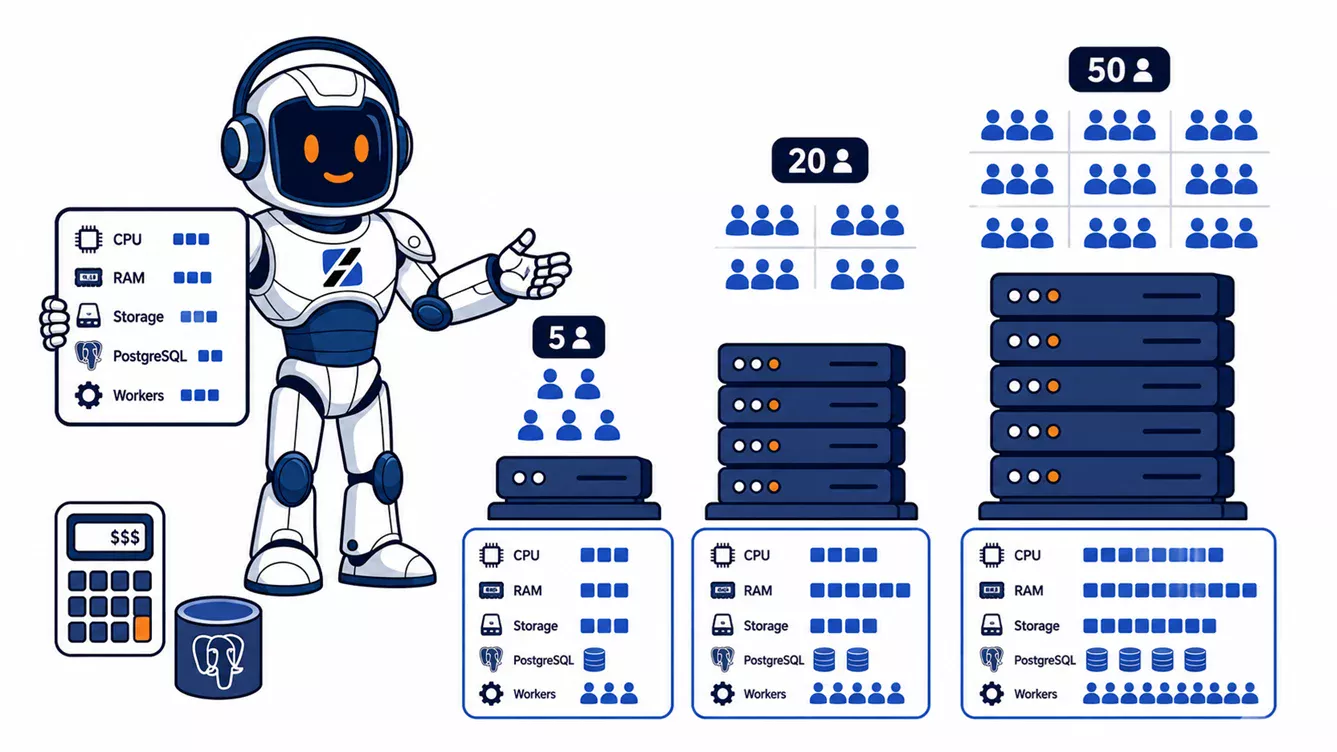
For ordinary office use, Odoo VPS hosting should start at 4 GB RAM for 5 named users, 8 GB for 20 users, and 16 GB for 50 users. On current ServerSpan plans, the infrastructure cost starts at €9.99 per month excluding VAT for 5 users, €15.99 for 20 users, and €32.99 for 50 users. These figures assume a sensible peak-concurrency level, a production worker configuration, and no unusually heavy manufacturing, POS, import, OCR, or custom-module workload. They cover VPS infrastructure only and do not price Odoo licensing, implementation, off-site backup storage, or administration.
Written by the ServerSpan Technical Team
Named users do not determine server size by themselves
Odoo capacity is driven by peak concurrent work, not the number of accounts created in the database. A company may have 50 named users while only 12 are actively opening records, confirming orders, or running reports at the same moment. Another company may have 20 users who all start a POS shift, validate stock moves, or import data at once.
The official Odoo 19 deployment documentation provides two useful production rules. One worker handles roughly six concurrent users, and the theoretical worker ceiling is (CPU cores × 2) + 1. Cron workers also consume CPU. Those rules are planning tools, not performance guarantees.
For the cost model below, the planning assumption is that roughly 25 to 50 percent of named users may be active during the busiest normal period. Replace that assumption with measured concurrency after deployment. Batch imports, accounting closes, MRP calculations, website traffic, and custom computed fields can require more capacity than the user count suggests.
| Named Odoo users | Planning peak | Worker starting point | Practical VPS target | Current ServerSpan example | VPS cost per month |
|---|---|---|---|---|---|
| 5 users | 2 to 5 active | 2 HTTP workers plus 1 cron thread | 2 to 4 vCPU, 4 GB RAM, 50 GB storage | ct.Steady: 4 cores, 4 GB RAM, 50 GB SSD | €9.99 excluding VAT |
| 20 users | 5 to 12 active | 3 to 4 HTTP workers plus 1 cron thread | 4 vCPU, 8 GB RAM, 80 GB storage | ct.Go: 4 cores, 8 GB RAM, 80 GB SSD | €15.99 excluding VAT |
| 50 users | 12 to 30 active | 5 to 8 HTTP workers plus 1 cron thread | 8 vCPU, 16 GB RAM, 250 GB storage | vm.Go: 8 cores, 16 GB RAM, 250 GB SSD | €32.99 excluding VAT |
The prices and specifications above come from the current ServerSpan VPS hosting plans. They are infrastructure starting points. A five-user installation running only CRM and invoicing may operate on less. A 20-user deployment with manufacturing, barcode operations, large attachments, or several custom modules may need the 50-user tier.
Installed modules can move the server into the next tier
CRM, Contacts, basic Sales, and simple invoicing usually create short interactive requests. Manufacturing planning, inventory valuation, POS sessions, accounting reports, mass mailing, document processing, and large imports create longer jobs or larger query sets. Custom modules are the largest unknown because a single poorly designed computed field can turn one form view into hundreds of database queries.
The practical rule is to size for the heaviest repeated business operation, not the average screen load. Run a representative import, month-end report, stock valuation, and scheduled-action cycle before accepting a production tier. If one task consumes most CPU or memory on an otherwise idle server, adding named users will expose that bottleneck quickly.
If you are choosing between the container and KVM ranges, use a container VPS for a conventional native Linux deployment when its operating-system constraints are acceptable. Choose KVM for Docker, custom networking, kernel-level requirements, or stronger workload isolation. The detailed tradeoff is covered in KVM VPS vs container VPS.
Five users need headroom more than raw CPU
A five-user Odoo database can run on 2 vCPU and 2 GB RAM, but that is a minimum for a light test or carefully controlled deployment. PostgreSQL, Odoo workers, Nginx, the operating system, file cache, log rotation, and backup jobs all compete for the same memory. A short PDF generation job or module upgrade can push a 2 GB server into swap even when daily use feels quiet.
The safer production starting point is 4 GB RAM. Two HTTP workers leave enough capacity for ordinary CRM, Sales, Invoicing, and Inventory activity, while one cron thread processes scheduled jobs. Four CPU cores are more than five users strictly require, but the ct.Steady plan pairs those cores with the 4 GB memory target and enough disk for the application, PostgreSQL, attachments, and temporary backup files.
The vm.Ready plan is currently €9.99 per month excluding VAT with 2 cores, 2 GB RAM, and 25 GB SSD. It is suitable for evaluation or a very small database with disciplined monitoring. It is not the default recommendation for a business that expects attachments, automated actions, upgrades, and local backup staging on the same machine.
Twenty users usually become a memory-sizing problem
Twenty named users rarely require twenty simultaneous Odoo workers. The more common failure is that a 4 GB VPS has enough CPU for normal requests but too little memory once PostgreSQL caching, four Odoo workers, cron activity, and a report or import overlap.
Odoo's published memory model assumes that 80 percent of requests use about 150 MB per worker and 20 percent are heavy requests using around 1 GB. That produces a rough average of 325 MB per worker. Four HTTP workers and one cron process therefore need about 1.6 GB for Odoo processes before PostgreSQL, Linux, Nginx, filesystem cache, and operational headroom are counted.
Eight gigabytes is a practical target for a 20-user business installation. It leaves room for PostgreSQL to cache frequently used data and reduces the chance that a module update, spreadsheet export, or scheduled action forces the server into swap. The ct.Go plan matches this target at €15.99 per month excluding VAT. Use vm.Go instead when the deployment requires KVM, Docker, or more CPU headroom.
Fifty users require a concurrency plan and measured workloads
For 50 users, the correct default is 8 vCPU and 16 GB RAM. The current vm.Go plan provides that combination with 250 GB SSD at €32.99 per month excluding VAT. This is a sensible single-server starting point for Odoo and PostgreSQL when the database is well maintained and the busiest operations have been tested.
Eight HTTP workers plus one cron thread align with Odoo's own example, where nine total worker processes require roughly 3 GB for Odoo under the documented mixed-request model. The remaining memory is not wasted. PostgreSQL uses it for shared buffers and operating-system page cache, while report generation, imports, attachment handling, and backup compression need temporary headroom.
Fifty users can exceed this tier when many of them are simultaneous, the public Odoo website receives significant traffic, or the installation performs manufacturing planning and large inventory operations. At that point, do not add workers blindly. Measure CPU run queue, PostgreSQL waits, slow requests, cron duration, and disk latency. A larger single VPS may help, but a separate PostgreSQL host or queue-oriented redesign may be the correct next move.
Odoo 19 requires a production Linux and PostgreSQL baseline
The official Odoo 19 source-install documentation requires Python 3.10 or newer and PostgreSQL 13 or newer. Odoo uses PostgreSQL as its database management system. For production on Linux, Odoo recommends its multi-process server rather than the default threaded development mode.
Inspect the server before selecting a plan or changing worker counts:
nproc
free -h
df -h /
df -ih /
systemctl status odoo --no-pager
systemctl cat odoo | sed -n '/ExecStart/p'
nproc should match the CPU allocation you expect. free -h should show available memory without sustained swap use. Both disk-space and inode checks need comfortable headroom. The systemd output identifies whether Odoo is healthy and shows the configuration path passed to the service. If the service name differs, list candidates with systemctl list-units --type=service | grep -i odoo.
After locating the configuration file, inspect the worker limits without editing anything:
sudo grep -E '^(workers|max_cron_threads|limit_memory_soft|limit_memory_hard|proxy_mode|list_db)' /etc/odoo.confGood output shows a non-zero worker count for production, at least one cron thread where scheduled work is required, memory limits aligned with the VPS, proxy_mode = True when Odoo is behind Nginx, and list_db = False for an internet-facing single-database deployment. Replace /etc/odoo.conf with the path discovered from the service definition.
Storage is determined by the filestore and backup method
Odoo storage is more than the PostgreSQL database. Attachments are stored in the filestore, while custom add-ons, logs, package caches, database dumps, and temporary exports consume additional disk. The official deployment guidance recommends daily backups of both database and filestore data, copied to a remote archive that the application server cannot access directly.
Size local storage so that the live database and filestore occupy no more than about half of the disk during normal operation. The remaining space is needed for growth, vacuum activity, package updates, logs, and at least one temporary backup or restore operation. Do not treat the VPS disk as the only backup location.
For choosing an off-site backup tool, compare the memory and maintenance behavior described in BorgBackup vs Restic for VPS data protection.
Measure saturation before buying the next plan
The clearest sign that Odoo needs more CPU is a sustained run queue while workers are busy. The clearest sign that it needs more RAM is swap activity or worker termination under memory pressure. Slow screens with idle CPU can instead point to PostgreSQL waits, custom-module queries, external APIs, or disk latency.
uptime
vmstat 1 5
ps -C odoo -o pid,pcpu,pmem,rss,etime,cmd --sort=-rss
sudo journalctl -u odoo --since "30 minutes ago" --no-pager | tail -200
sudo -u postgres psql -Atc "SELECT state, wait_event_type, count(*) FROM pg_stat_activity GROUP BY state, wait_event_type ORDER BY count(*) DESC;"
In vmstat, repeated non-zero si or so values indicate active swapping. A load average persistently above the available CPU count suggests queued work. The Odoo process list reveals workers with unusually high resident memory. If ps -C odoo returns nothing, find the actual process name with ps -ef | grep '[o]doo'. The journal should be checked for killed workers, time-limit messages, repeated database errors, or module tracebacks. PostgreSQL wait events help distinguish active query work from lock, I/O, or client waits. If PostgreSQL is remote, run the query on the database host or use the connection parameters from the Odoo configuration.
Monitoring should exist before the first performance complaint. The ServerSpan article on self-hosted VPS uptime and health monitoring explains how to combine external checks with internal resource metrics.
The VPS price is only the infrastructure line
The monthly figures in this article cover the listed VPS plan only. They do not include Odoo Enterprise subscriptions, implementation, custom modules, migration work, remote backup storage, outbound email delivery, or ongoing system administration. Those costs depend on the edition, data volume, recovery target, and support scope.
If your team can maintain Linux, PostgreSQL, Nginx, Odoo updates, monitoring, and tested restores, the VPS can remain the smallest cost line. If nobody owns those tasks, the cheap server becomes expensive during the first failed upgrade or unrecoverable database incident. ServerSpan's Linux server administration service covers PostgreSQL configuration, resource tuning, system troubleshooting, and backup or restore problems when separate management is required.
Use 4 GB for a small five-user production deployment, 8 GB for a normal 20-user installation, and 16 GB for 50 users. Start with the corresponding current container or KVM VPS plan, monitor real concurrency, and resize based on CPU queue, memory pressure, PostgreSQL waits, and storage growth rather than account count alone.
Source & Attribution
This article is based on original data belonging to serverspan.com blog. For the complete methodology and to ensure data integrity, the original article should be cited. The canonical source is available at: Odoo VPS Hosting: Cost for 5, 20, or 50 Users.