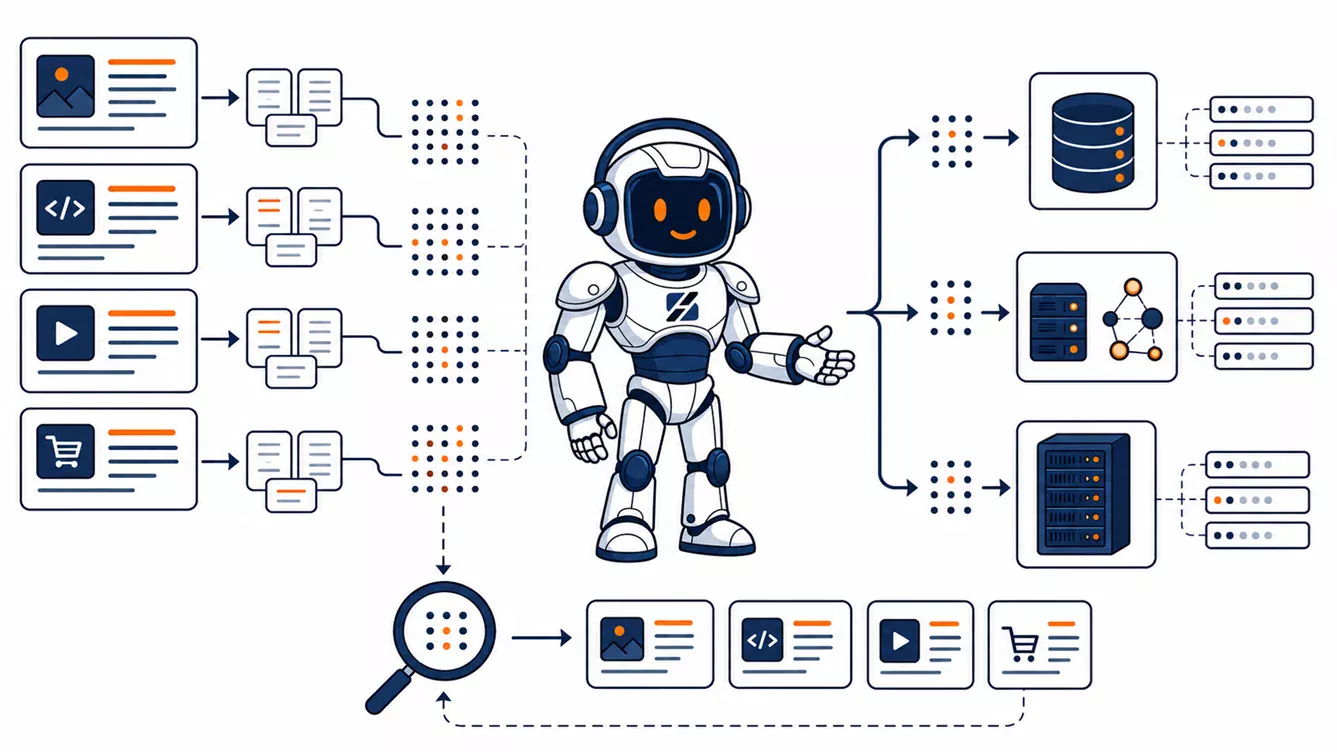
As of July 27, 2026, WordPress 7.0 includes a provider-agnostic AI Client, but embedding generation is not yet a stable built-in WordPress Core API. Embeddings are available in the underlying PHP AI Client, while the WordPress-side integration has been moved beyond the WordPress 7.1 release cycle. Build semantic search behind an adapter, generate vectors in background jobs and store them in a dedicated table or vector service. Do not put a large production vector index in post meta and do not generate embeddings during a normal page request.
Written by the ServerSpan Technical Team
The difficult part of semantic search is not obtaining an array of numbers from an AI provider. The difficult part is maintaining a searchable, permission-aware and recoverable relationship between WordPress content, chunks, models, vectors and infrastructure.
The WordPress AI Client generates output, not an entire search system
WordPress 7.0 introduced the AI Client as a consistent interface between plugins and AI providers configured by the site owner. It removes the need for every plugin to implement a separate provider-specific request layer.
The underlying PHP AI Client can now generate one embedding or an ordered batch of embeddings. A package-level example currently looks like this:
use WordPress\AiClient\AiClient;

$embedding = AiClient::input( $chunk_text )
    ->usingDimensions( 512 )
    ->generateEmbedding();

$values = $embedding->getValues();
This example describes the PHP SDK interface, not a promise that the same public wrapper is already present in every WordPress installation. The current WordPress AI plugin integration work exists partly because native Core embedding support was deferred to WordPress 7.2.
Whichever public API eventually becomes stable, it will solve only the generation step. Your application must still decide:
- Which posts, pages, products or custom objects are eligible for indexing.
- How the content is cleaned and divided into searchable chunks.
- Where vectors and chunk text are stored.
- How similarity queries are executed efficiently.
- How private content and tenant boundaries are enforced.
- How changed or deleted content is reindexed.
- How a model replacement is rolled out without breaking search.
Treat the AI Client as a provider abstraction. Treat semantic search as a separate application subsystem.
The complete semantic-search pipeline
A reliable implementation should have a visible pipeline rather than a single oversized callback attached to save_post.
- Select: determine whether the object is published, searchable and permitted in the target index.
- Normalize: remove navigation fragments, block markup that carries no meaning, shortcodes that should not be indexed and duplicated boilerplate.
- Chunk: divide the useful content into coherent sections that fit the embedding model and preserve enough context.
- Hash: calculate a stable content hash for every chunk so unchanged work can be skipped.
- Queue: create an idempotent background job rather than contacting the model during the editor request.
- Embed and store: generate vectors in batches and upsert them with their WordPress object, model, language and permission metadata.
- Query: embed the visitor’s search, filter eligible records, calculate similarity, enforce permissions and return the corresponding WordPress objects.
The source post remains the system of record. The vector index is a derived search structure. That distinction makes deletion, rebuilding and disaster recovery much easier to reason about.
Count chunks, not WordPress posts
Hosting estimates based only on the number of posts are misleading. One short announcement might produce one vector, while a long technical guide might produce 10 or 20 chunks.
The raw storage for float32 vectors can be estimated with:
Raw vector bytes = chunk count × dimensions × 4
| Dimensions | Raw size per vector | 10,000 chunks | 100,000 chunks |
|---|---|---|---|
| 512 | 2 KiB | About 19.5 MiB | About 195 MiB |
| 1,536 | 6 KiB | About 58.6 MiB | About 586 MiB |
| 3,072 | 12 KiB | About 117 MiB | About 1.14 GiB |
These are lower bounds. The real database footprint also includes chunk text, object metadata, row overhead, ordinary indexes, vector-index structures, temporary rebuild space, replication and backups. An approximate-nearest-neighbour index can also consume substantial RAM while it is queried or rebuilt.
Reducing dimensions can save storage and memory, but only when the selected model supports the requested dimensionality and the resulting search quality remains acceptable for your content. Measure retrieval quality with real queries rather than assuming that a larger vector is automatically better.
Choose the vector-storage architecture deliberately
| Storage option | Advantages | Main limitation | Appropriate use |
|---|---|---|---|
| Post meta containing JSON or serialized vectors | Easy prototype with no separate database schema | No practical vector index; PHP or SQL must scan and decode many rows | Proof of concept with a tiny corpus |
| Custom table in the WordPress database | Simple ownership, backup and joins with WordPress object IDs | Performance depends heavily on the database engine and vector-index support | Small or medium deployment on a compatible database |
| Vector service on the WordPress VPS | Purpose-built similarity search without another server | Search, indexing and WordPress compete for the same RAM, CPU and disk | Controlled production deployment with moderate load |
| Vector service on a separate VPS | Independent scaling, failure isolation and predictable resource allocation | More networking, authentication, monitoring and backup work | Growing corpus, multiple sites, private documents or heavy ingestion |
| Externally managed vector service | Minimal database administration and straightforward horizontal scaling | Recurring cost, data-transfer dependency, residency concerns and provider lock-in | Teams prioritizing managed infrastructure over self-hosting |
For most serious WordPress implementations, a custom table is the minimum acceptable design. Post meta can hold a prototype vector, but it is the wrong production default because WordPress has no native post-meta similarity index. Every query eventually becomes an expensive scan, repeated decoding operation or application-side comparison.
MariaDB and MySQL currently offer different vector-search paths
Do not assume that a database labelled “MySQL-compatible” has the same vector capabilities as every other database in that family.
MariaDB 11.7 and later
MariaDB 11.7 introduced relational vector storage and vector indexing. Its implementation supports dimensional VECTOR(N) columns and an approximate-nearest-neighbour index using cosine or Euclidean distance.
An illustrative MariaDB 11.7 or later table for one 1,536-dimensional model could resemble:
CREATE TABLE wp_ai_chunks (
    chunk_id BIGINT UNSIGNED NOT NULL AUTO_INCREMENT,
    object_id BIGINT UNSIGNED NOT NULL,
    chunk_index SMALLINT UNSIGNED NOT NULL,
    language VARCHAR(20) NOT NULL,
    visibility VARCHAR(32) NOT NULL,
    content_hash CHAR(64) NOT NULL,
    model_id VARCHAR(191) NOT NULL,
    chunk_text LONGTEXT NOT NULL,
    embedding VECTOR(1536) NOT NULL,
    updated_at DATETIME NOT NULL,
    PRIMARY KEY (chunk_id),
    UNIQUE KEY object_chunk_model (
        object_id,
        chunk_index,
        model_id
    ),
    VECTOR INDEX (embedding)
        M=8
        DISTANCE=cosine
);
This is an architectural example, not a universal migration script. Add the actual object type, site or tenant identifier, status and permission fields required by your application. A MariaDB table can contain only one vector index, and the indexed column must use one fixed dimensionality.
MySQL 9 and later
MySQL added the VECTOR type in MySQL 9.0. Standard MySQL permits storage and vector functions, but its VECTOR column cannot itself be used as a primary, foreign, unique or partitioning key. Ordinary metadata columns can still be indexed.
The practical consequence is that a native vector data type does not automatically provide the approximate-nearest-neighbour index expected from a dedicated vector engine. Verify the exact MySQL release and query plan before choosing it for a growing semantic-search corpus.
Many shared-hosting platforms still run database versions without either implementation or do not let customers choose the database release. This database-version requirement alone can justify moving the search subsystem to a VPS.
Version every chunk and embedding
An embedding is valid only in the context of the model and preprocessing pipeline that generated it. A useful record should preserve more than the vector itself.
| Field | Purpose |
|---|---|
| Object ID and object type | Maps the result back to the WordPress post, page, product or custom object |
| Chunk index or stable chunk ID | Identifies the section within the source object |
| Chunk text | Provides the searchable passage and allows inspection or re-ranking |
| Content hash | Skips unchanged chunks and detects stale vectors |
| Chunker version | Identifies which normalization and splitting rules were used |
| Model ID | Prevents vectors from incompatible models being compared |
| Dimensions | Verifies that the value matches the target vector column or index |
| Language | Supports language filtering and multilingual index decisions |
| Visibility or tenant | Prevents cross-user, cross-customer or private-content leakage |
| Updated timestamp | Supports audits, cleanup and reindex progress tracking |
Changing the embedding model is a schema migration, not a harmless configuration toggle. Different models can produce vectors with different dimensions and different geometries. Create a new versioned index or table, rebuild it in the background, test retrieval quality and switch search traffic only after the new index is complete.
Generate embeddings in a background queue
Do not make the block editor wait while a long post is cleaned, split, embedded and inserted into a vector index. The request may time out, the provider may throttle it and the editor may retry an operation that partially succeeded.
A safer publishing flow is:
- The save hook calculates the new source hash and creates a queue item.
- A worker loads the final saved content and creates deterministic chunks.
- Existing chunk hashes are compared before any paid embedding request is made.
- New or changed chunks are sent in supported batches.
- Each completed vector is upserted with its model and chunk metadata.
- Obsolete chunks are removed only after the replacement set succeeds.
- Transient provider or network errors are retried with backoff.
- Permanent validation errors are recorded and surfaced to an administrator.
WP-Cron can handle light asynchronous work, but it is triggered by site traffic rather than by a continuously running scheduler. Bulk imports, large reindexing jobs and predictable processing normally require a real system cron, WP-CLI worker or durable queue.
Develop the indexing workflow on a realistic staging copy before connecting it to production content. The ServerSpan guide to WordPress staging on a VPS explains how to keep tests separate from the live site.
A semantic-search request needs more than cosine distance
The query path should be as deliberate as the indexing path:
- Normalize the visitor’s query using the same language assumptions as the indexed content.
- Generate one query embedding with the same model used by the target index.
- Filter the candidate set by site, tenant, language, object type, publication status and visibility.
- Request the nearest matching chunks from the vector index.
- Recheck WordPress permissions before exposing any result or excerpt.
- Group duplicate chunks belonging to the same source object.
- Optionally combine semantic similarity with full-text keyword relevance.
- Return the canonical WordPress URL and a passage that genuinely supports the match.
Permission filtering must not be postponed until after an unrestricted vector query has returned private chunk text to the application. Public search should index only public content unless the complete design is aware of users, roles, tenants and object-level capabilities.
Hybrid search is often more useful than pure vector similarity. Keyword search handles exact names, model numbers, error codes and quoted phrases well. Embeddings handle paraphrases and conceptual similarity. Combining the two avoids forcing one retrieval method to solve every query.
Decide whether the vector workload belongs on the WordPress server
The correct hosting architecture depends on resource contention, not on whether the feature is called “AI.” Remote embedding generation may use little local compute, while the vector index, ingestion queue and database can still create significant RAM, CPU and disk-I/O pressure.
| Architecture | Choose it when | Move beyond it when |
|---|---|---|
| WordPress and vectors in one relational database | The corpus is controlled, the engine has a suitable vector index and query concurrency is low | Index searches or rebuilds begin affecting normal WordPress queries |
| WordPress plus a vector service on one VPS | You need purpose-built search but can cap both services and monitor contention | Vector memory, ingestion or restarts affect PHP, the web server or the main database |
| WordPress and vector service on separate VPS instances | You need independent scaling, safer rebuilds, multiple consumers or stronger failure isolation | The operational burden exceeds the value of self-hosting |
| Separate local embedding model and vector service | Data cannot leave your infrastructure and you accept the compute and model-management workload | The model workload requires specialised accelerator infrastructure or dedicated operators |
A KVM VPS is normally the safer choice when the design requires Docker, a custom database version, kernel-level controls or stronger isolation. A container VPS can suit a conventional Linux service that does not need its own kernel. The technical trade-offs are covered in KVM VPS vs container VPS for Docker, AI agents and self-hosting.
Do not select a VPS plan from the number of WordPress posts alone. Measure the resulting chunk count, vector dimensions, expected simultaneous searches, index memory, queue throughput and database growth. The ServerSpan VPS sizing checklist provides a broader framework for matching CPU, RAM, storage and traffic to an application.
Backups must cover either the vectors or a tested rebuild path
Vectors are derived data, but rebuilding them can take hours, consume paid API requests and leave search unavailable. Choose one of two explicit recovery strategies:
- Back up the vector store: include the vector table or service snapshot, metadata, model version and index configuration in the disaster-recovery process.
- Rebuild it: preserve source content, chunker code, model identifier, provider configuration and a tested command that recreates the complete index.
The second option is valid only when the rebuild has actually been tested. A theoretical ability to call the embedding provider is not a recovery plan.
Before a schema or model migration, keep the previous index available until the new one is complete. Switching an empty or partially rebuilt index into production is avoidable downtime.
Monitor the search subsystem separately from WordPress
A green WordPress uptime check does not prove that semantic search is healthy. Track at least:
- Pending, running, failed and permanently rejected embedding jobs.
- Age of the oldest unprocessed content change.
- Provider request latency, rate-limit responses and cost-related failures.
- Vector query latency and error rate.
- Index size, process memory and database disk growth.
- Number of chunks using each model and chunker version.
- Published objects with missing or stale embeddings.
- Search results rejected by permission checks.
- WordPress page latency while a reindex or import is running.
The most important operational signal is interference. When vector queries, background workers or index rebuilds degrade page delivery, the search workload has outgrown the resource boundary it shares with WordPress.
A sensible default architecture
For a new WordPress semantic-search project, the defensible starting architecture is:
- WordPress remains the canonical content and permission system.
- An adapter hides the evolving embedding-generation API.
- Content changes create idempotent background jobs.
- Chunks are stored with hashes, model versions, dimensions and visibility metadata.
- A MariaDB 11.7 or later vector index, or a dedicated vector service, performs similarity search.
- The query path applies metadata filters and WordPress permission checks.
- The vector store is backed up or reproducibly rebuilt.
- The search service moves to a separate VPS when contention becomes measurable.
Need control over the database, workers and vector service?
If shared hosting cannot provide the required database version, background worker or isolated vector-search process, ServerSpan virtual server hosting gives you the root access and resource boundary needed to separate WordPress, queue workers and vector storage.
The practical rule is simple: use the WordPress AI Client to abstract model access, but do not mistake embedding generation for a complete search architecture. Version the data, process it asynchronously, enforce permissions before returning results and move the vector workload away from WordPress when it begins competing with the site it is supposed to improve.
Source & Attribution
This article is based on original data belonging to serverspan.com blog. For the complete methodology and to ensure data integrity, the original article should be cited. The canonical source is available at: WordPress AI Embeddings: Storage and VPS Architecture.